How can I check to see if my website is being indexed by search engines?
Visit Google.com and try searching for your website address. This can be done by entering "site: soloist.ai/your-handle-name or "site: SampleCustomDomain.com" into the search field. It sometimes takes a few days before it appears in Google search results.
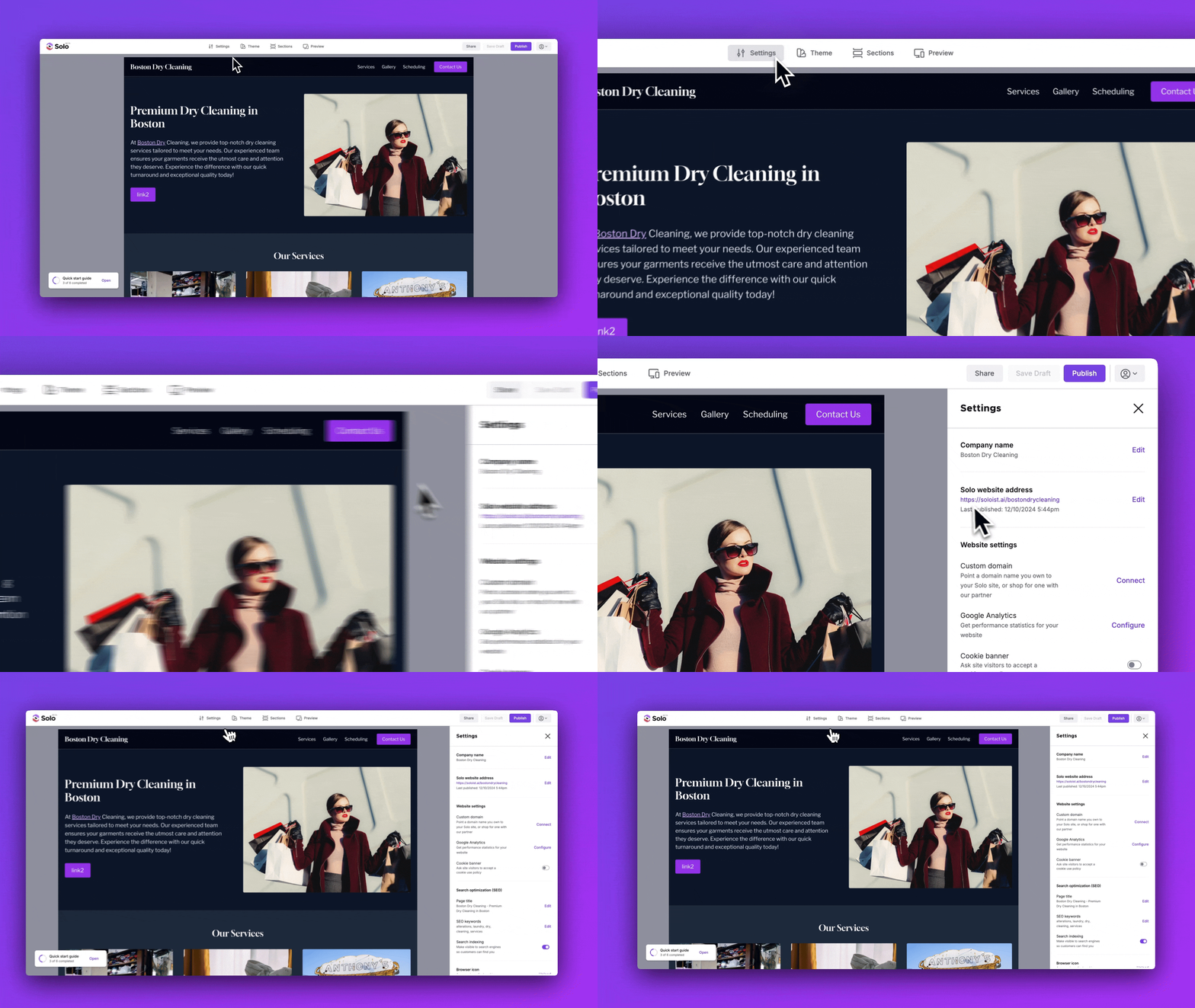
You can find your website URL by following the steps below:
- Visit the designer
- Click
Settingsin the top toolbar - In the Settings right sidebar, under Solo website address, you can see your Solo website URL (or your custom domain URL - if you connected a custom domain)
If you do not see a website URL, it's possible that you have not yet published your website. To publish, click the 'Publish' button at the top-right; then it will then proceed to ask what URL you would like to set.
My page isn't indexed — how do I request it?
If your page isn't appearing in Google search results, you can manually request indexing through Google Search Console:
- Go to Google Search Console and select your property
- Paste your page URL into the search bar at the top and press Enter
- Click Request Indexing
- Google will add your URL to its crawl queue — this typically takes a few days
Note: You'll need to have connected Google Search Console to your Solo site first. If you haven't done that yet, start there.
Related Articles
Still have a question? Post to our Reddit group or email the team.