Can I host videos or files?
Solo supports uploading of custom images but not direct uploading of videos or files to your website. If you want to add videos or files (eg PDFs) to your Solo website, we recommend using third-party hosting vendors (e.g. YouTube, Vimeo, Google Drive) and then adding links to those videos or files to buttons in your website. Unlisted Vimeo videos are also supported. You can also embed certain video or file types by using the Code embed section or the Video section (instructions below).
To link to a video using the Video section,follow the steps below:
- Visit the designer
- In the top toolbar, click
Sections - In the Sections right sidebar, click
Add section - Double click the
Videosection in the modal to add it to your website - In the designer area, scroll down to the Video section, and hover over the section
- Click
Edit section - In the Video right sidebar, you can add your video link
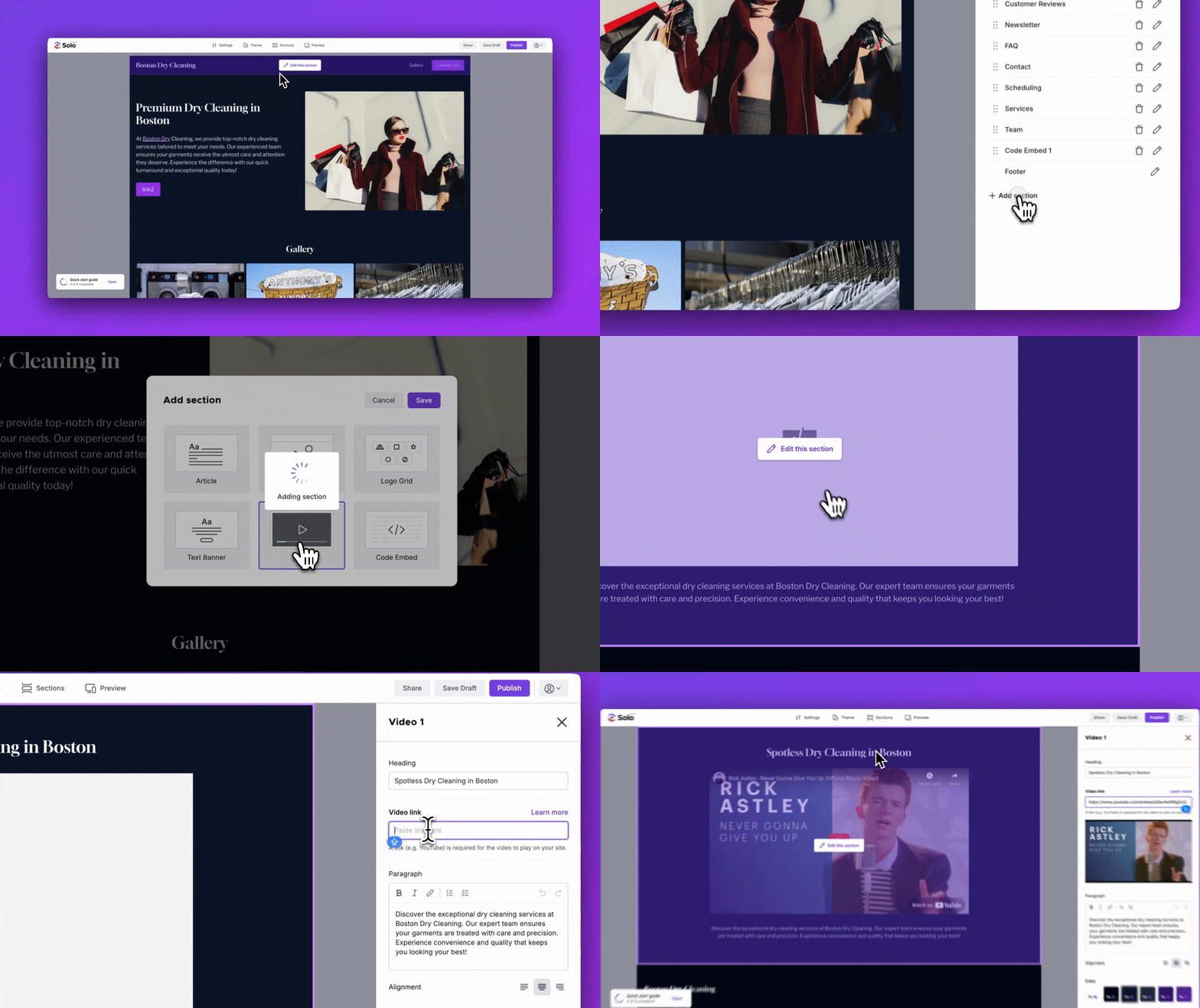
Each Video section supports up to 8 videos, and you can add up to 3 Video sections to your Solo website.
Note: If your video is not playing correctly as you would expect in the Preview or Published version of your website, make sure you are adding a link from the supported third-party video hosting vendors.
Related Articles
Related Articles
Still have a question? Post to our Reddit group or email the team.