Why is my custom domain not successfully connecting?
If you receive an error email indicating that Solo was unable to successfully connect your custom domain or see a message like below in Settings, then we ran into an issue.
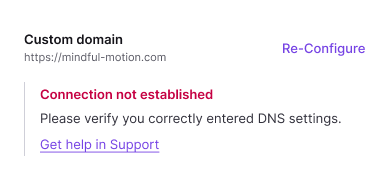
There are a few reasons your custom domain may not have connected on the first attempt. Some of the most common reasons are below. Note, it can take up to 48 hours for the domain connection process to complete so the below tips are only if you see an error or receive an error email:
For reference, here are the DNS values:
| Record | Host Name | Value |
|---|---|---|
| A | @ | 34.128.166.114 |
| CNAME | www | sites.soloist.ai |
| TXT | @ | custom value provided |
Note, if you are manually adding your DNS records, you may need to set the Host Name to blank, depending on your domain registrar, for the A and TXT record fields if "@" is not allowed.
Check Your DNS Records
Enter your domain name below to verify if your DNS records are configured correctly.
If you're still having issues, we may have encountered some error on our side. Please contact us at support@soloist.ai and we will investigate.
- You entered your DNS details incorrectly. If you entered your DNS details manually, please make sure you entered them correctly. You will enter a TXT, an A and a CNAME record. If there are existing A or AAAA records pointing to other non-Solo IP addresses, you will need to delete them. If there are existing CAA records, they should also be deleted as they prevent Solo from issuing an SSL certificate via Google. Solo now verifies DNS CAA records before attempting certificate generation, so restrictive CAA records will block the process early. Additionally, if an SSL certificate fails, Solo will automatically delete the failed certificate and recreate it on the next attempt. Please also confirm that there are not exact duplicate TXT and/or CNAME records. If you're unable to find your DNS records, you can click "Re-configure" or "Configure" again and restart the process from Solo. To check what DNS records are showing for your domain, we suggest using the Google Dig tool and entering your domain with and without the "www." and confirming the values look correct. You will want to look at the A record, CNAME record and TXT record values. If they don't match below, this means our system is not seeing the correct DNS records.
- Confirm that you are the owner of the domain. You can do this by visiting the registrar site where you registered this domain and making sure that you can log-in and that you have access to edit and configure the domain. Note, if you attempt to connect a domain that has previously been connected to Solo by another user, we may show an error as we need to do additional manual ownership verification. In this case, please contact support@soloist.ai and we will get this resolved.
- Confirm a proxy is not enabled. Some domain registrars, such as Cloudflare, allow you to configure a proxy for the A record. You should turn this off.
- Confirm domain forwarding is not enabled. Some domain registrars, such as GoDaddy, allow you to enable domain forwarding. If it is enabled, please turn it off and confirm the DNS records are correct You'll likely have to delete any extra A records that were present for domain forwarding.
Related Articles
Related Articles
Still have a question? Post to our Reddit group or email the team.