How do I cancel my Solo Pro plan?
Note: This applies to both Pro and Grow plan subscribers.
If you choose to cancel your subscription, your plan will remain active until the end of your current billing cycle (cancel-at-period-end). You will retain all Pro or Grow benefits until that date. After the billing period ends, you will lose access to paid features including websites and images that have exceeded the Free plan limits.
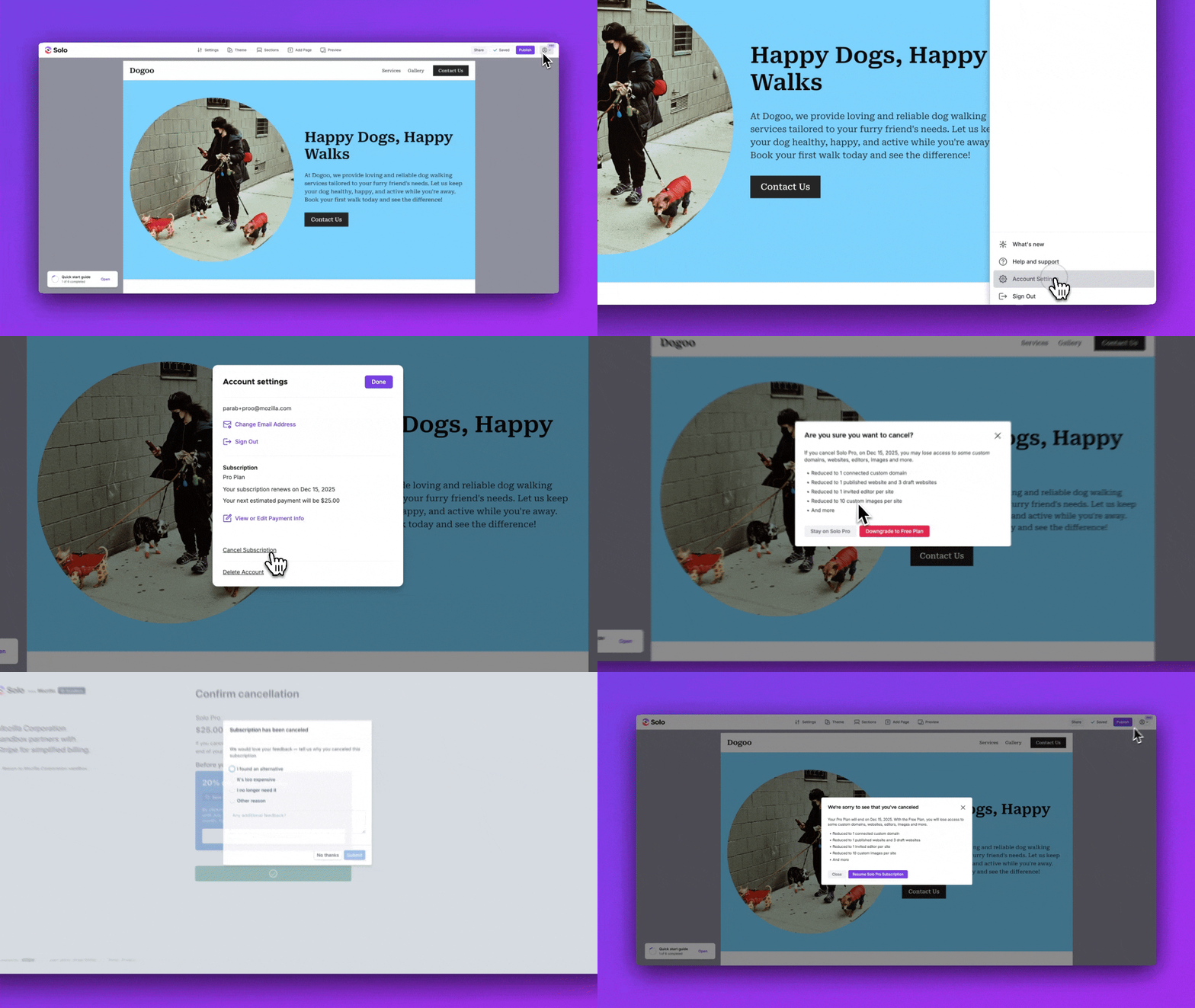
To cancel your subscription, please follow the steps below.
- Visit the Designer
- Click the account menu at the top right
- In the account menu, click
Account Settings - Click
Cancel subscription - You will be redirected to the Stripe customer portal to confirm cancellation
- Click
Cancel subscription - Observe you see the subscription has been canceled pop-up. Note, your subscription will end at the end of your billing cycle. You will retain your paid plan benefits until that date.
- Confirm you have received an email indicating that your subscription will end
If you cancelled but your billing period has not yet ended, you can resume your subscription. Go to Account Settings > Manage Billing and click Resume subscription in the Stripe customer portal. Your plan will continue without interruption.
Related Articles
Still have a question? Post to our Reddit group or email the team.